
A rostering system that knows the rules as well as you do
SkyShifter builds the roster from your watch patterns and shift rules (based on UK Reg (EU) 2017/373 where used), checks every change against your unit’s duty-hours and staffing rules and, when a shift falls short, suggests who could cover it — then asks them for you through the iOS and Android app.
Clearly presented rosters analysed and checked by SkyShifter’s advanced Rules Engine
Most rosters are built by hand, and the rules live in the head of whoever builds them. SkyShifter keeps both in one place and keeps staff up to date with changes.
Rule breaches caught as you edit
Every change is checked against your rules straight away. A block stops the roster being published; a warning can be accepted with a reason.
Cover found, not phoned round for
When a shift is short, SkyShifter lists everyone who could work it without breaking a rule, and offers it to them in the app.
Months built from the pattern
Watches follow their pattern automatically. Leave, swaps and overtime are changes on top of it, each one marked on the board.
The roster in everyone’s pocket
Controllers see the live roster on their phone, opening on their own watch, and are told about changes that affect them.
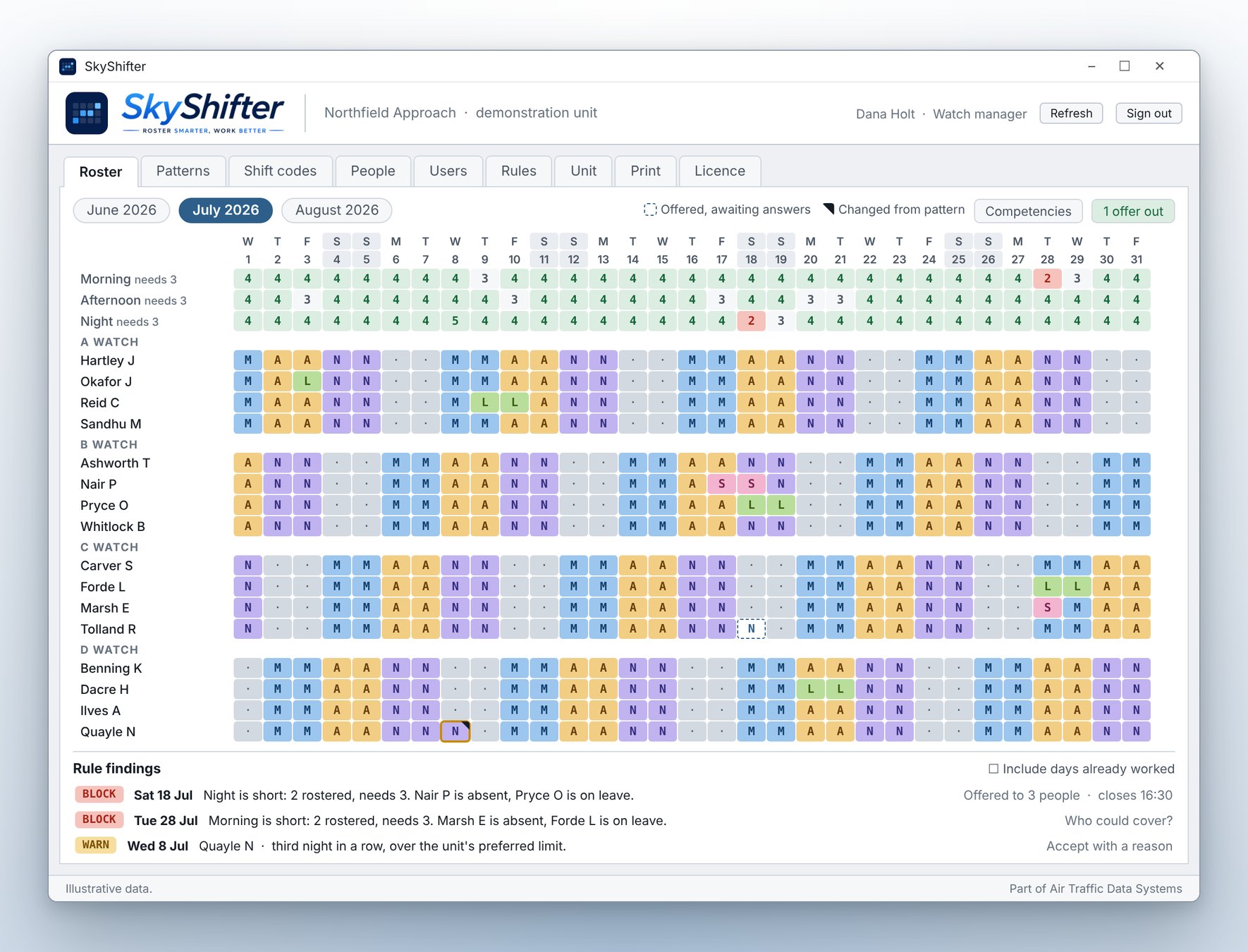
The whole month, and where it falls short
One board for the unit: every watch, every person, every day, with cover counted along the top and the rule findings listed underneath.
- Cover rows count each shift against the complement required
- Cells changed from the pattern are marked, so nothing moves unnoticed
- Rule findings listed by date, either blocks or advisories
- Switch on the competency layer to see how close each person’s next expiry is
- Shift codes, colours and cover rows are all yours to define
- Print a month per page, or the findings list as a table
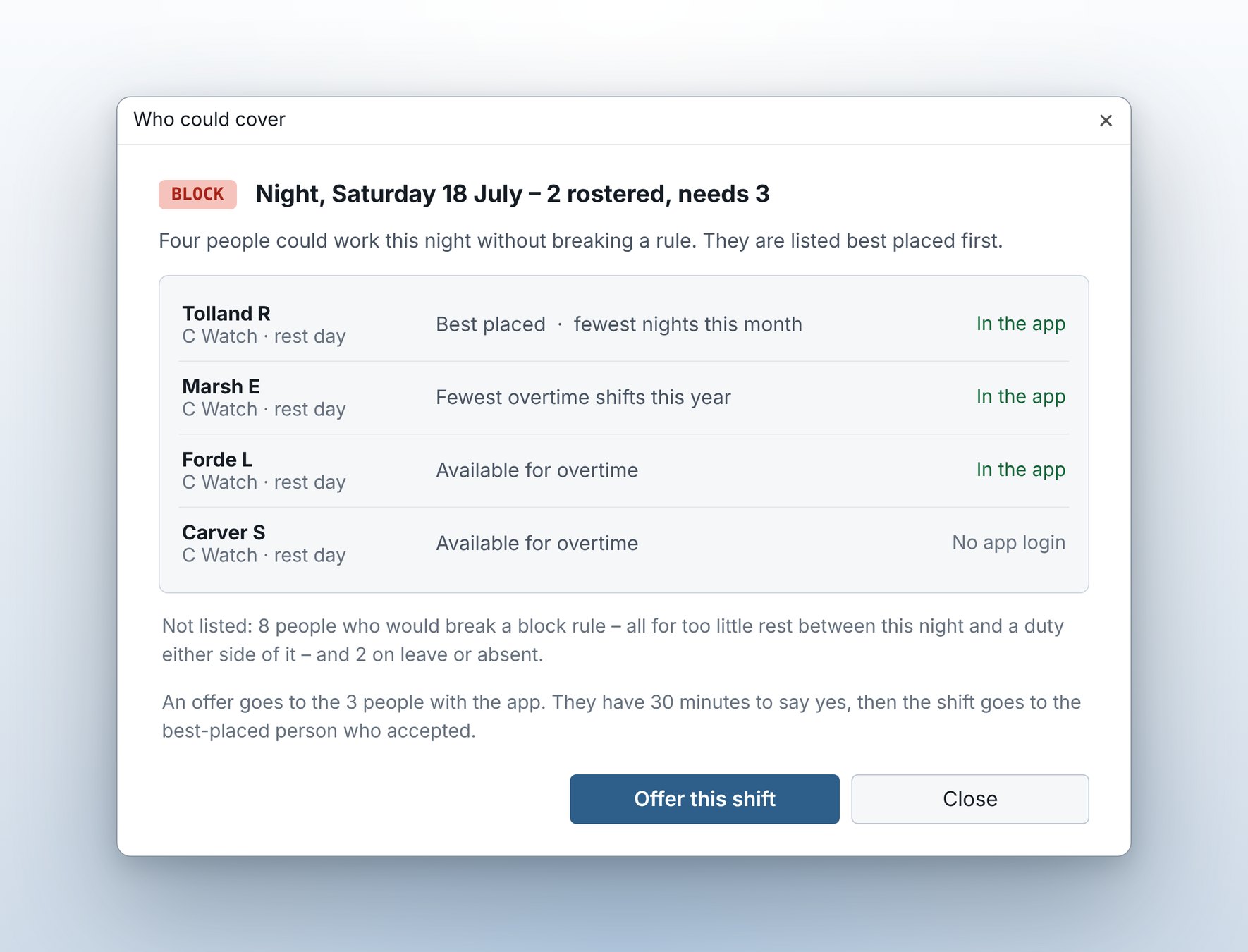
Who could cover this shift?
Checking against the Rules Engine, SkyShifter proposes a list of who could work the shifts. These can then be offered in person or via the app.
- Lists everyone who could work the shift compliantly
- Offer the shift to everyone able to work it, at once, from the same window
- The best-placed person who accepts is given the shift
- Or allocate it directly when the decision is already made
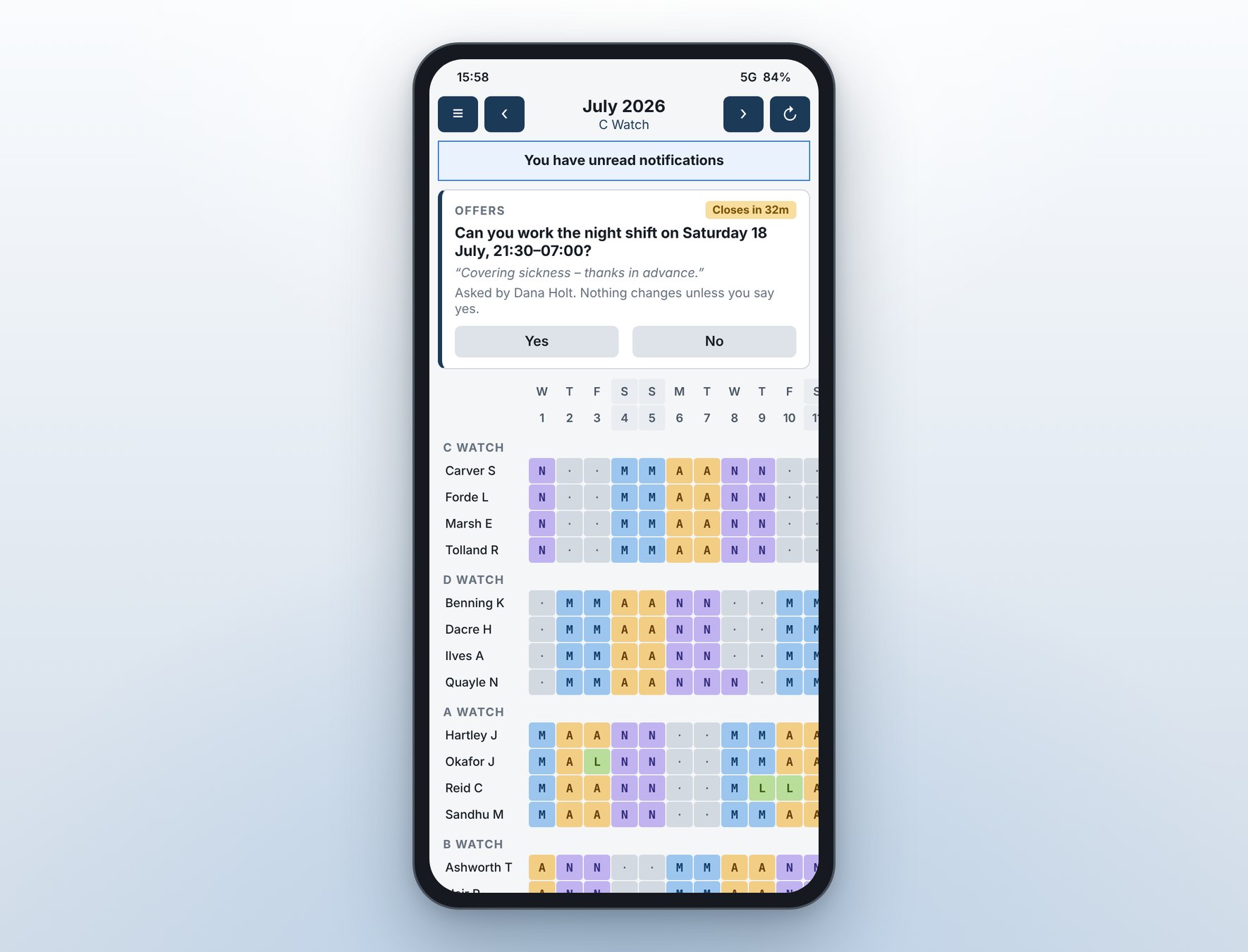
Answer an offer in two taps
The mobile app is deliberately simple: it shows the roster and lets people answer what they are asked. It cannot change the roster.
- The live roster, opening on your own watch
- Overtime offers with a countdown — nothing changes unless you say yes
- Notifications for the roster changes your Watch Manager wants you to know about
- Your own ratings and medical, with their expiry dates
Your rules, customised
A unit starts from duty-hours limits derived from UK Reg (EU) 2017/373 and changes whatever its own scheme requires. Every rule is a configurable setting, not a line of hard code.
Talk to us about your scheme- Set each rule to block or warn, and change its limits
- Scope a rule to one watch or one person for a documented local variation
- Date a rule, so a changed limit does not reopen a published month
- Night and early-start duties are classed from the shift times themselves
- Describe a rule in plain English and the AI assistant proposes it for you to approve
- Operating hours for units that are not open round the clock, anchored to sunrise and sunset if needed
Built around how your unit already works
Watches and patterns
Define a pattern once and put each watch on it at its own offset. Individuals can follow a pattern of their own.
Auto-generated rosters
For people without a fixed pattern, SkyShifter fills the month within the rules, following your preferences for run length and for evening out shift types and weekends.
Leave and absence
Leave is only marked on days the pattern made a duty, and people can be flagged as available for overtime while they are off.
Works with MEIDS
Add people straight from your MEIDS staff list, and see their ratings and competency dates against the roster.
Your data, on your server
Each unit hosts its own SkyShifter database. Phones reach it through an encrypted relay, and roles decide what each person can see and change.
Rule packs
Export a set of rules to a file and import it at another unit, reviewing what each rule will do before anything is saved.