
Every training hour, report and sign-off, on one record
ATRACS follows a controller from their first training session to their annual competency check. OJTIs write reports on a tablet, Trainees sign them off, Assessors and Verifiers close each level — and the Training Manager sees all of it as it happens.
Training records that keep themselves up to date
Paper reports, spreadsheets of hours and a diary of expiry dates all describe the same thing. ATRACS holds it once, and everyone sees the part that is theirs.
Reports written where the training happens
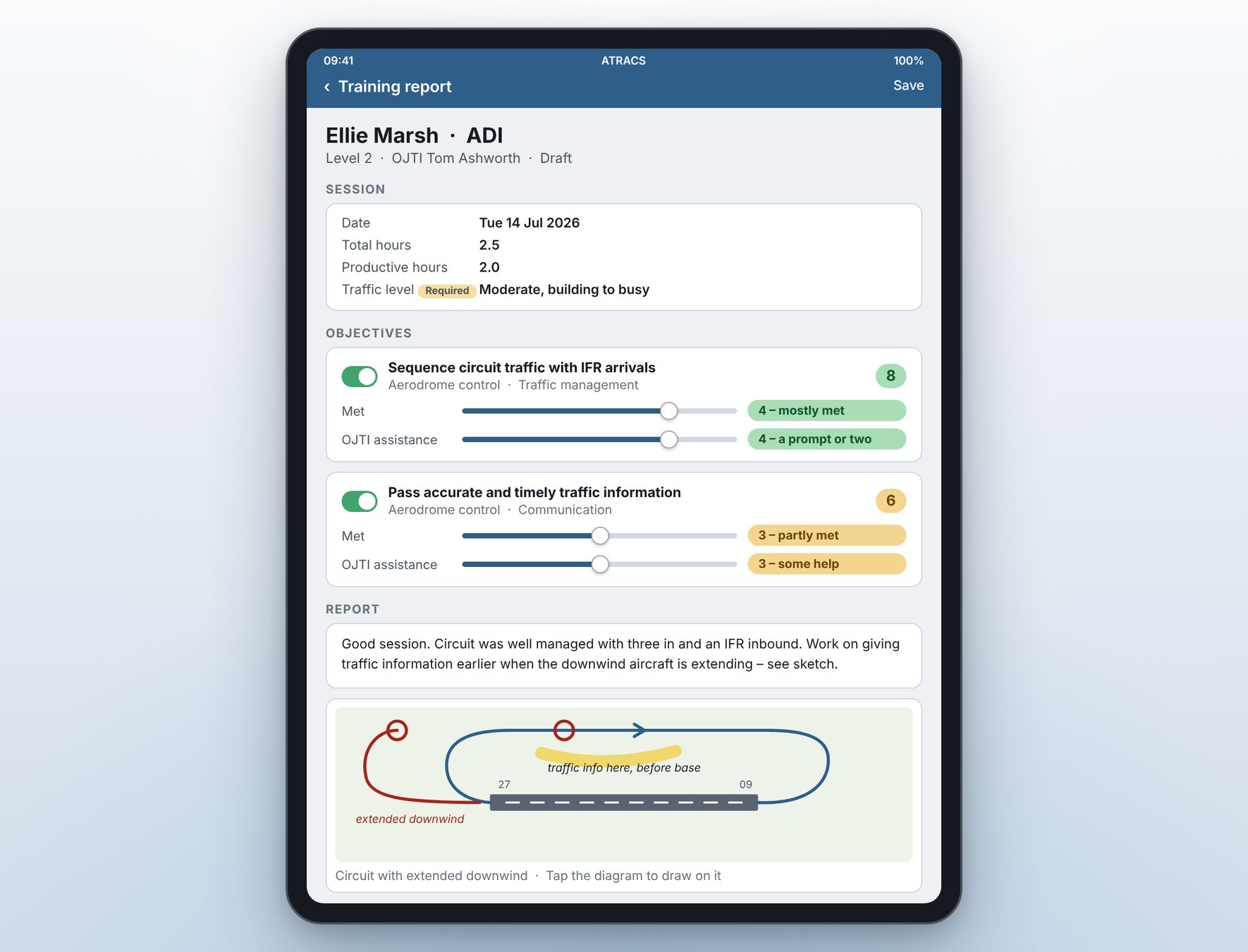
The OJTI writes the session up on a tablet — hours, scores, write-up and a sketch of what happened — and sends it straight to the Trainee to sign.
Progress nobody has to compile
Hours per level, scores per objective and average hours to pass are worked out from signed-off reports, for every Trainee, all the time.
A record you can stand behind
A signed-off report is sealed and cannot be altered. Level passes are confirmed by a second person before they are final.
Competency dates that do not slip
Annual competency checks are tracked form by form, with a clear view of who is ready for sign-off, whose window is open and who is overdue.
Written on a tablet, signed by the Trainee, sealed
Each training session produces one report. It is built for the OJTI who has just unplugged, not for the office.
- Date, total hours and productive hours, plus whatever fields your unit adds
- Each objective covered is scored on two sliders: how far it was met, and how much OJTI help it took
- Write-up built from blocks of text and diagrams, in any order
- Draw on a chart from the unit’s library, a photo, or a blank page
- The Trainee reads it, adds their own comment and signs off
- Once signed, the report and its diagrams are sealed for good
Everyone knows where they stand
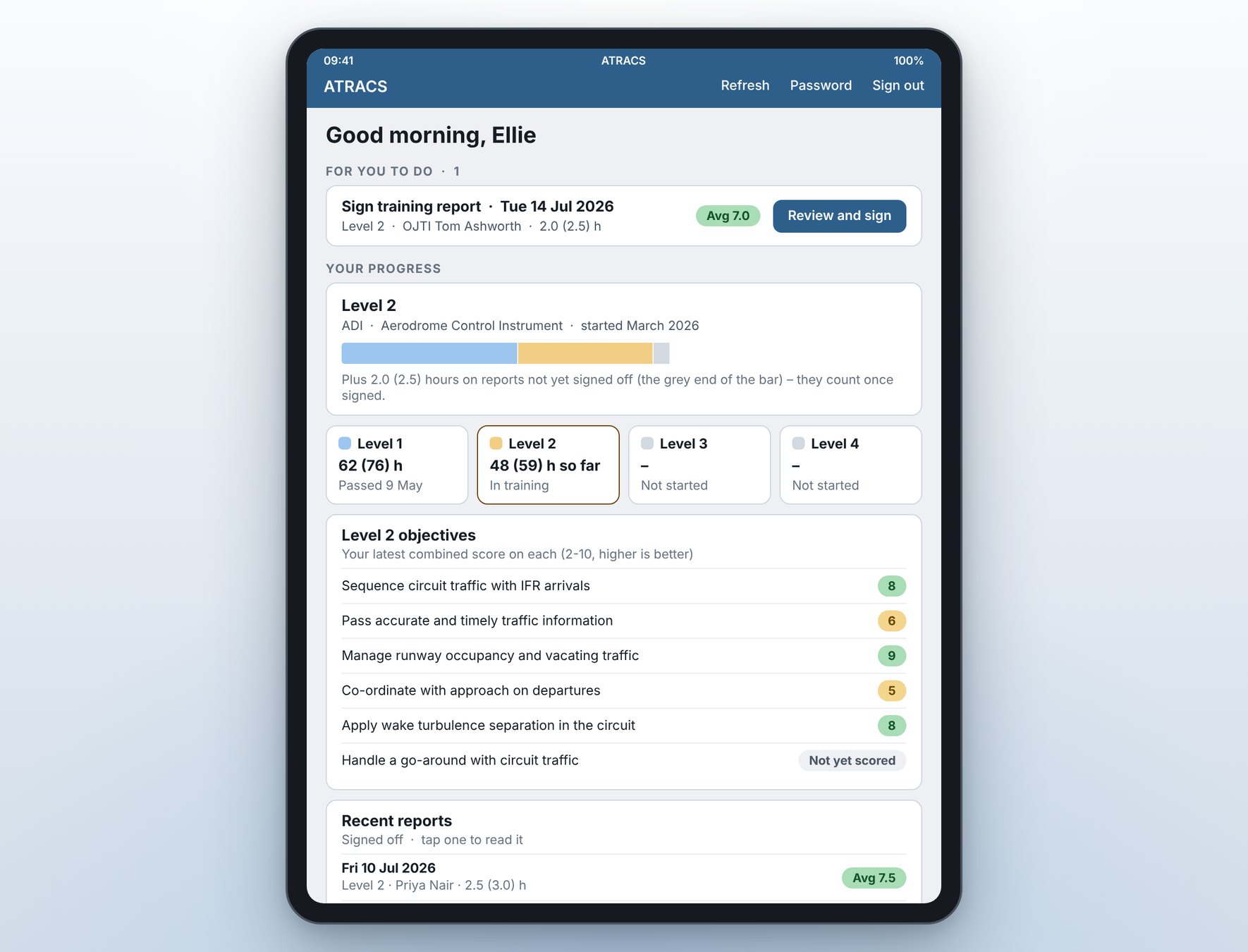
Trainees open the app to what is waiting for them, and to an honest picture of their own progress.
- Reports waiting for sign-off at the top of the screen
- Hours at each level, including those still waiting on a signature
- Latest score on every objective at the current level
- Every signed-off report, there to be read again
A pass that has been checked twice
Trainees work through levels within each endorsement — ADI, APS, APP or whatever your unit trains for. Each level ends the same way.
Level assessment
An endorsed Assessor marks each objective satisfactory or unsatisfactory. Every objective must be satisfactory to pass.
Provisional pass
The Trainee starts the next level straight away, so training is not held up waiting for paperwork.
Independent verification
A Verifier picks the assessment up from a shared pool, reads it alongside the Trainee’s reports, and confirms or rejects it. Anything past your unit’s target is flagged.
The whole training picture on one screen
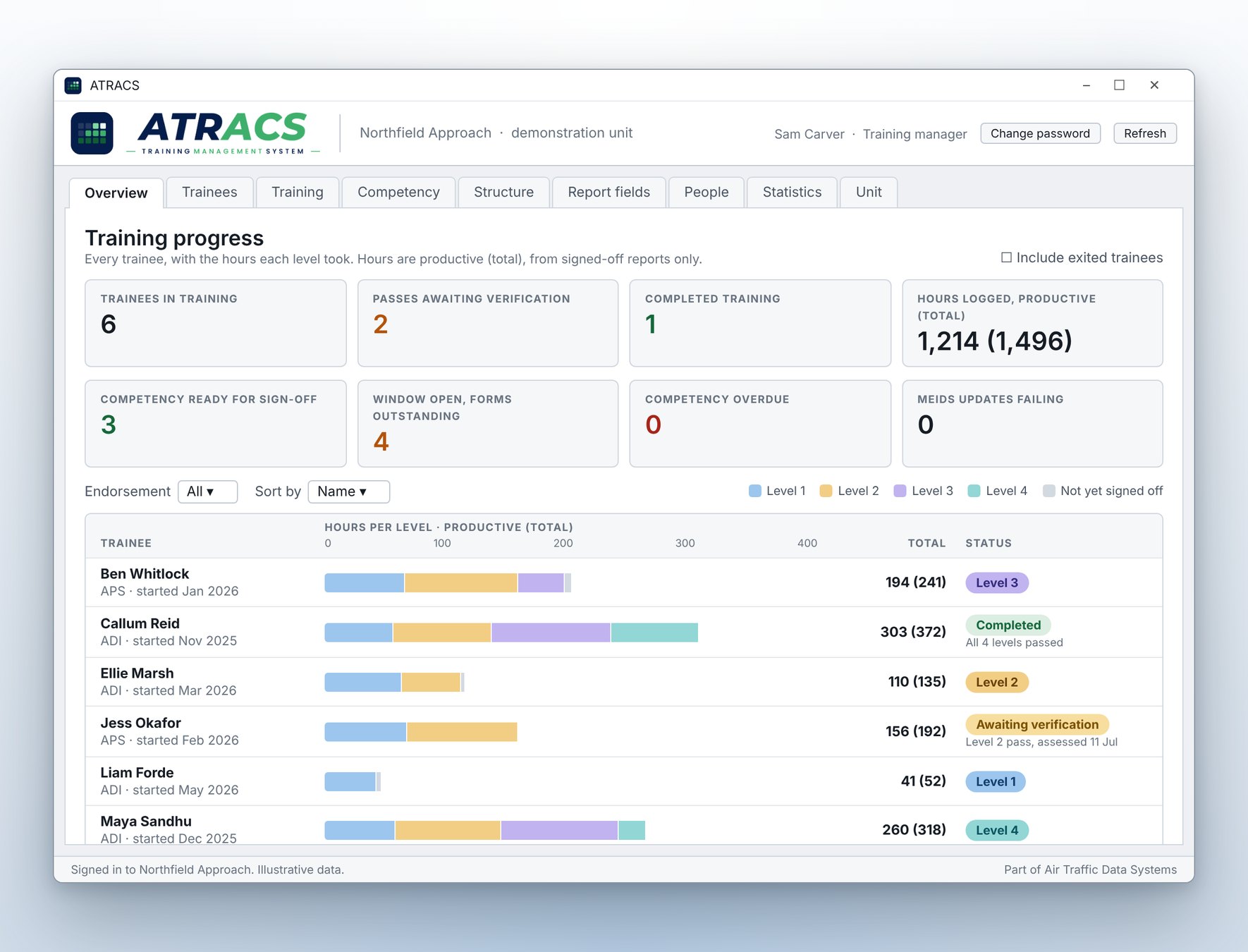
The Windows desktop app is where the unit is set up and where training is managed.
- Every Trainee, with a bar showing the hours each level took
- Average hours to pass each level, per endorsement
- Passes awaiting verification, and who has picked them up
- Competency checks ready for sign-off, in their window, or overdue
- Statistics, with graphs you can save and come back to
- People only see the tabs their role allows
The annual cycle, for controllers who are already valid
Competency runs alongside training as its own track: a repeating cycle rather than a climb through levels, built from forms your unit defines.
Talk to us about your scheme- A competency plan can cover one endorsement or several
- Forms are required or optional, and can be completed at any time in the period or only in the sign-off window
- Different Assessors can complete different forms
- An Assessor signs the check off once every required form is done
- Sign off inside the window and the anniversary is kept; sign off earlier and it moves
- Periods and windows are settings on the plan, so they follow your rules
Your structure, your systems
Your own training plan
Endorsements, levels, objectives and report fields are all yours to define. Import an existing training plan or competency form from Word or PDF and ATRACS suggests the objectives for you to review.
Works with MEIDS
Where a unit runs MEIDS, ATRACS reads staff and endorsement dates from it, and writes the new competency expiry back when a check is signed off.
Your data, on your server
Each unit hosts its own ATRACS database. Tablets used off site reach it through an encrypted relay that forwards traffic and stores nothing.
The right view for each person
Trainee, OJTI, Assessor, Verifier and Training Manager each see the work waiting for them, and only what their role allows.
Tablet, desktop and Lite
iPad and Android for day-to-day training, a Windows desktop app for management, and ATRACS Lite for writing reports on a shared PC.
Retention you control
Set how long the records of Trainees who have finished or left are kept, after which they fall due for deletion.
See ATRACS with your own training plan in mind
Tell us how your unit trains and checks competency today, and we’ll show you how ATRACS would handle it.